How to Enhance your Get Gigs Worker Profile to Land the Gig
Stand out to employers with a top-tier GigSmart profile. Learn how to improve your chances of landing gigs by optimizing your profile details.
2 min read
Once you have created your account and completed your worker profile click Browse to view jobs and apply to work opportunities in your area. You’re in control of when and where you work. It’s possible to start working the same day you sign up!
Get Gigs connects you to a variety of job opportunities:
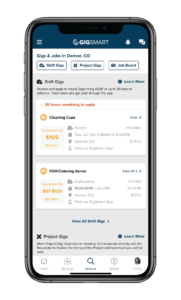
Shift Gigs: Shift Gigs are posted by business requesters who are hiring workers for on-demand shifts on specific dates. Shift Gigs can be posted ASAP or up to 30 days in advance. When you work a Shift Gig, your hours will be tracked and your payment will be transferred to your Worker Wallet within the Get Gigs app.
Project Gigs: Project Gigs are posted by residential requesters who are seeking workers to complete their household tasks and projects. You can apply to Project Gigs by submitting bids at a pay rate of your choosing, and, if hired, you’ll work directly with the requester to finalize the project timeline and payment method.
Job Board: Positions listed on the GigSmart Job Board are open part-time or full-time positions posted by a business. You can click into a particular job post to learn more information about the position including instructions for applying.

The browse tab allows you to see all of the available work opportunities in one place. Easily browse or search your Shift Gigs or full/part-time job posts. The Get Gigs app automatically shows you every applicable gig or job within 75 miles of your location.
Once you have carefully read the gig description to make it’s a good fit, tap “Apply” to submit your application.
If you are applying for a Shift Gig, follow and complete the prompts to submit your application. Once you have submitted your application, you can view the Gig under your applied gigs.
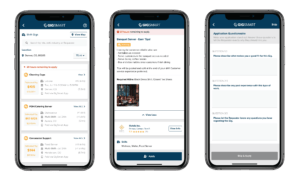
Note: Financial Verification is required on all Shift Gigs to ensure that you get paid. Additionally, if you choose to apply to a Verified Gig, you’ll need to opt-in to Background and/or MVR Verification. Verified Shifts require a background check and/or motor vehicle records check in order to work them. If you haven’t already opted-in, you can follow the prompts to enroll into Verification. Opting-in is free. The background check and/or motor vehicle records check will run once you’ve applied and are hired to work a Verified Gig.
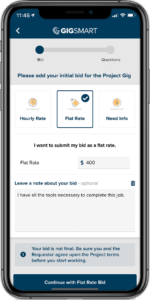
When applying to a Project Gig, you must submit a bid in one of the three following ways:
Next, complete the application questionnaire to help your application stand out. Once you have submitted your application, you can view the Project Gig from your Applied tab.
If the Requester chooses to hire you, it will be up to you and them to finalize your bid, the Project timeline, and your payment details.
If you are applying to a part-time or full-time position on the Job Board, you are submitting your information directly through to the hiring company’s website or email address and following their application process.

Now that you know how easy it is to apply to work opportunities in your area, let’s walk through what to expect after you start applying.